Send one link to your client. Control the session in real time, from anywhere.
Simple for clients. Precise for therapists.

See BilateralSync in action
Everything you need for online EMDR.
See how BilateralSync connects the therapist workspace, client experience, bilateral stimulation and virtual Light Bar in one simple workflow.
How it works
From link to session in under a minute.
Create a session
One click gives you a secure, unguessable link.
Share the link
Paste it into your video call chat. Any device, any browser.
Run the session
Control pattern, speed, size, audio and timer in real time.
Made by therapists
Created by EMDR therapists.
Built for EMDR therapists.
Clinical first
Built for real therapy sessions.
Evidence‑informed
Based on EMDR standards & research.
Privacy by design
No client data stored. Untraceable links.
Trusted worldwide
For online, in‑room and hybrid EMDR.
Everything included
Every detail, refined for the therapy room.
Everything you need during an EMDR session, without another layer of complexity. You set it up once, then stay with your client.

Seven bilateral patterns
Horizontal, vertical, diagonal, circular, infinity, pendulum and random.
Light Bar mode (Professional)
A fullscreen clinical light sweep with BPM, intensity and direction control. New in Professional.
Stereo bilateral audio
Independent left and right tones with adjustable frequency and volume.
Realtime synchronization
Changes reach the client as you make them.
Keyboard shortcuts
Adjust the session without looking away from your client.
Space←→MAFEsc
Session timer
Set the length and let the timer handle the rest.
Fullscreen client view
A distraction-free screen with only the target.
Emergency stop
Stops visuals, audio and the timer instantly.
Unlimited presets
Save a session setup and recall it next time.
Inside the tool
Built around how a session actually runs.
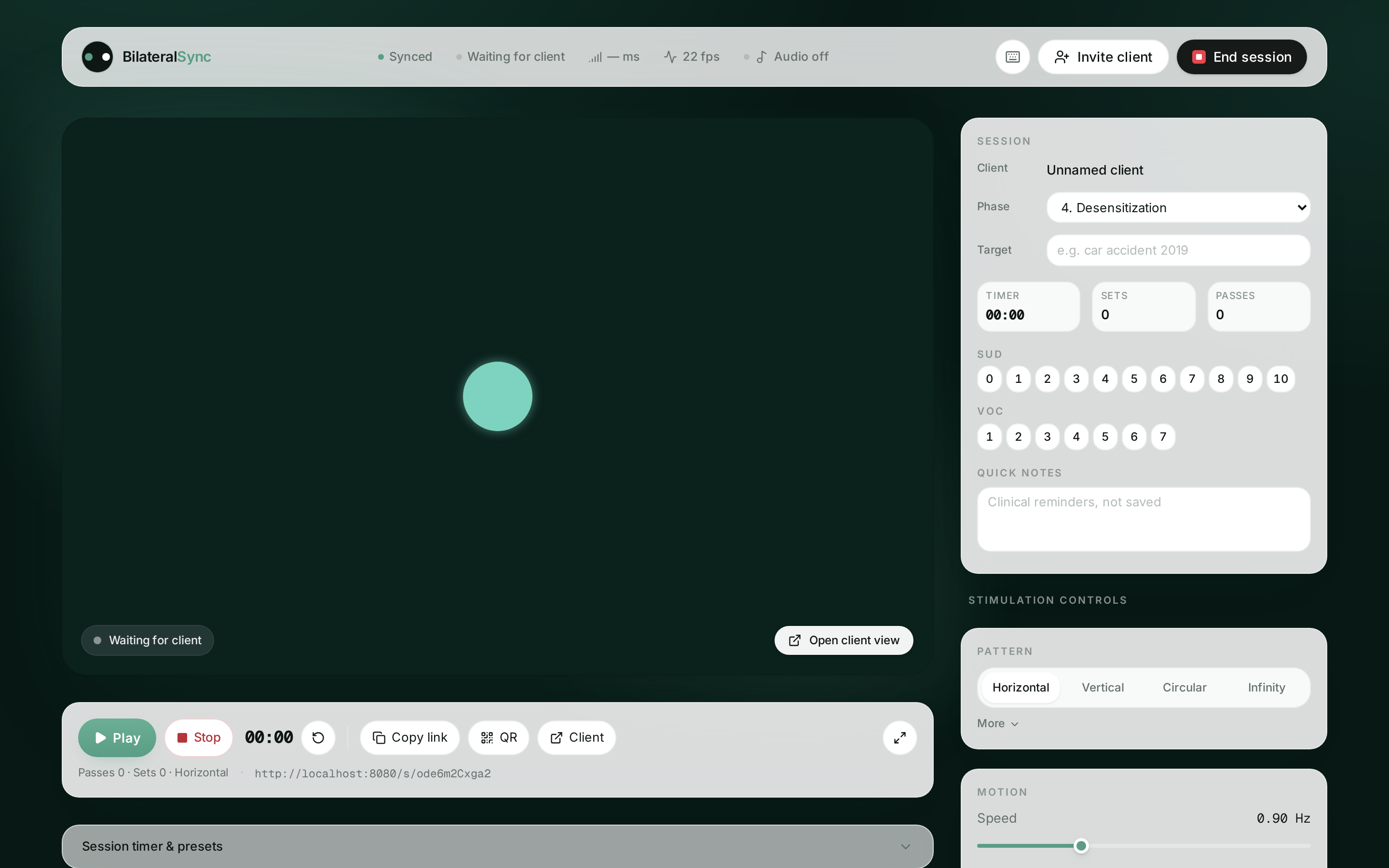
Session workspace
One quiet screen. Everything in reach.
Live stage, clinical controls and transport in one view.
Play, stop, reset · Copy link · Client view
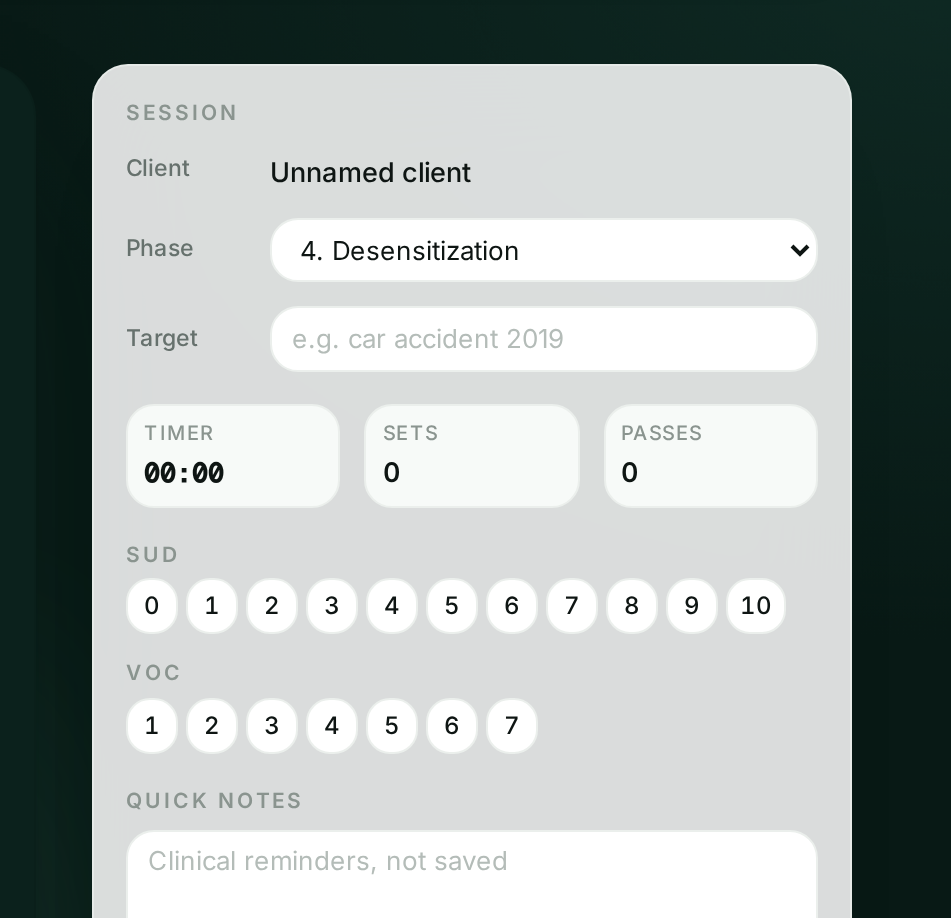
Clinical panel
Phase, target, SUD and VOC beside the stage.
Everything you need during the session, right where you need it.
SUD & VOC · 8 phase protocol · Local notes
Live demo
Try the real product.
No sign up needed.
This is the exact engine your client sees. Change the pattern, adjust the speed, toggle the audio.
Controls
Pattern
Share /s/<code> with your client to run a real session.
Try the real toolOpens the full therapist panel. Create an account to invite clients — 14 days free.

Built for the calm, precise work of modern EMDR
Pricing
Simple pricing. No surprises.
Try Professional free for 14 days. Nothing charged today.
Your first 14 days
FreeFull Professional access from minute one
- Nothing charged for 14 days
- Apple Pay, Google Pay or card
- Cancel in one click before day 14
- Use it with real clients straight away
- No client accounts, ever
- Your account stays yours if you cancel
Professional
For individual therapistsBilled annually, after your 14 free days
- 14 days free, €0 today
- Light Bar mode (New)
- All patterns and features
- Real time bilateral audio
- Unlimited sessions
- Session timer and presets
- Priority email support
Pay with Apple Pay, Google Pay or card. Your first payment is only taken after 14 days, and you can cancel in one click from Settings → Billing at any time.
FAQ
Common questions
What is bilateral stimulation in EMDR therapy?
Bilateral stimulation (BLS) is the alternating left and right stimulation, visual, auditory or tactile, used in EMDR to support the brain’s Adaptive Information Processing of distressing memories.
How does online EMDR with BilateralSync work?
You create a session, share the secure link with your client, and control the visual and auditory bilateral stimulation in real time. The client sees only the calming target.
Does my client need an account or installation?
No. Your client opens the link in any modern browser on desktop, tablet or phone. No app, no account, no downloads.
Is BilateralSync GDPR‑ready?
Yes. Sessions use unguessable codes, no client PII is collected, and we use cookieless, anonymous analytics.
Can I use auditory bilateral stimulation?
Yes. Stereo left/right panned tones with adjustable frequency and volume play in perfect sync with the visual target.
Does it work with Zoom, Teams and Doxy.me?
Yes. The client view is a plain URL. It runs alongside any video platform. Most therapists share it through the in‑call chat.
Is BilateralSync a medical device?
No. BilateralSync is a clinical tool for trained EMDR therapists. It is not a medical device and does not replace clinical training or a therapeutic relationship.
Which devices and browsers are supported?
Chrome, Safari, Firefox and Edge on macOS, Windows, iPadOS, iOS and Android.
Start your next EMDR session in five seconds.
No sign‑up. No card. No client account. One link and you're working.